

https://api.joystream.ai/mcp. Connect a coding agent such as Claude Code or Codex to it and the coding agent can list your workspaces, write and build agent definitions, run agents, read runs and tickets, download run files, and search connector actions and skills. It acts as you, with your role in each workspace.
The quickest way to connect is the JoyStream plugin, which registers the server and adds three skills for authoring, shipping, and debugging agents.
Signing in
The server uses OAuth, not an API key. On first use your MCP client opens JoyStream’s sign-in and consent page in a browser. Approve it and the client holds a grant for your account. Nothing is pasted into a config file. Each client you approve appears under Settings → Connected apps, where you can revoke it. A revoked app has to be approved again to reconnect, and loses access within about an hour.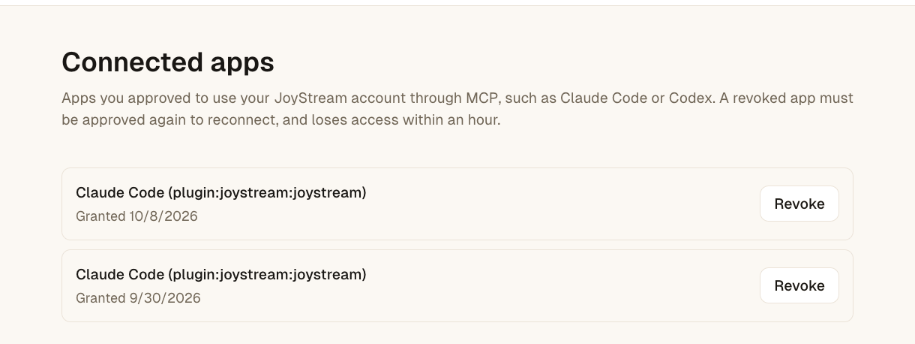
Settings → Connected apps lists every MCP client you approved.
Permissions
Tools act with your role in the workspace they touch. Viewers can read. Changing anything, including answering a paused run, needs member or above. A workspace you don’t belong to is reported as not found rather than forbidden. The server cannot manage members, sharing, vaults, billing, or settings. Use the web UI or the CLI for those.Confirming actions
The server is stateless, so a tool that would change something outside JoyStream does not act on its first call. It stores a proposal and returns a summary:confirm with the exact text, and the action runs once. A proposal expires after 5 minutes, and calling confirm again with the same summary returns the same result rather than acting twice.
Tools that require confirmation: run_agent with mode live (a real Run), execute_action, agent_credential_set, agent_credential_clear, and the Agent Universe actions that change something (agent_universe_publish, agent_universe_unpublish, agent_universe_update_version, agent_universe_clone, agent_universe_edit_listing, agent_universe_regenerate_listing, agent_universe_set_resources). Everything else acts immediately, including a Simulation (run_agent with mode dry_run).
Tools
Where a tool takesagent, it accepts a UUID, a bare handle, or org/workspace/handle. Several tools let you omit workspace when you belong to exactly one.
Read
Connectors
Agent Universe
See Agent Universe.
Author, build, and run
Resources and prompts
The server publishes reference documents your coding agent can read:
It also serves your own data as resources, such as
joystream://agents/{agent}/spec and joystream://runs/{run}, and prompts for common jobs: create-agent, improve-agent, ship-agent, triage-run, review-failures, debug-connection, and explain-agent. Codex does not support MCP prompts, which is why the plugin ships the same guidance as skills.
Limits
Requests over 1 MiB are rejected. Thewait_for_build and wait_for_run tools poll every 2 seconds for up to 120 seconds by default and at most 600. When too many waits are in flight the tool returns once with waited: false and a retry_after_s hint instead of an error.
Troubleshooting
- 404 “Endpoint not found”. The URL must be exactly
https://api.joystream.ai/mcp, with no trailing slash. - Sign-in loops. Sign in to JoyStream in the same browser first, then retry the client’s authenticate step.
- 401 “Needs authentication”. Re-authenticate from the client. In Claude Code run
/mcp, choose joystream, then Authenticate. In Codex runcodex mcp login joystream. - Starting over. Revoke the app under Settings → Connected apps and authenticate again.